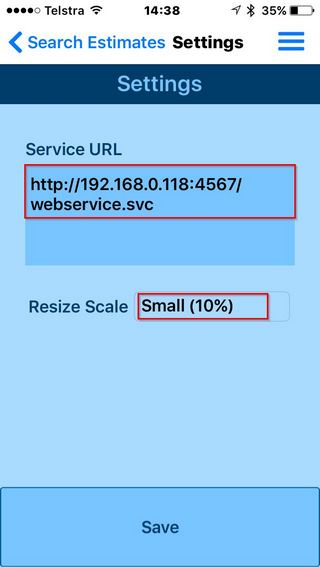
There are two items required to be setup in EQ Photos
- Service URL - This the IP address of your EQ server
- Resize Scale - Size you would like your images to be resized to - recommended setting is Small (10%).
Setting Up EQ Photos
- Open EQ Photos APP
- Press Menu icon on upper right of Screen
- Select Settings from popup menu

Settings
- Service URL - This the IP address of your EQ server followed by ":4567/webservice.svc" - This setting should only be changed by your IT administration or PPG support
- Resize Scale - Size you would like your images to be resized to - recommended setting is Small (10%).
- Press Save to save your settings