The following should be carried out to install EQ on a new computer.
- Install Windows with computer name to describe the customer who the box is for
- Create EQ users - eqsql (Administrator) and eq (Standard)
- Install other required software
- Sql Express Advanced 2012
- Teamviewer - ninite.com
- 7 Zip - ninite.com
- Chrome - ninite.com
- Antivirus (Kaspersky)
- Configure Sql Express
- Turn on Filestream in Management Studio
- Turn on Filestream in Sql Configuration Manager
- Enable TCP/IP connections
- Configure Teamviewer for Unattended Access
- Set computer not to sleep in Power save options
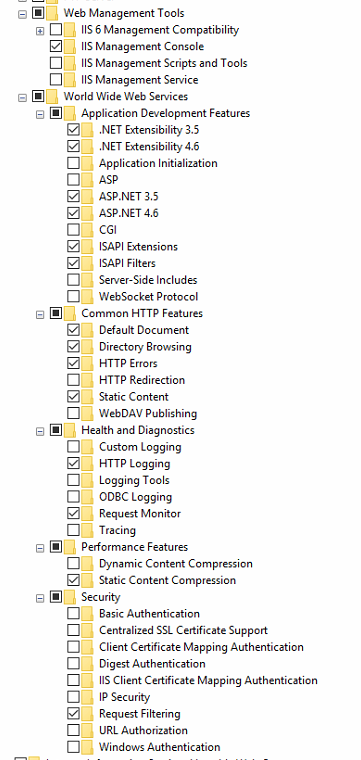
- Enable Internet Information Services (IIS)
- Turn on Windows Features
- Run EqInstaller from c:\installs
- Installs the application into the default eq folder
- Installs the Service - need to set Service to run as eqsql
- Installs the Webservice for EQ Photos, SFDC
- Restores the EQ_Blank database
- Installs the firewall rules
- Installs back up tasks
- Add data
- Add System users (script available)
- Add Main Entity (shop name) (script available)
- Add users (script available)